I put some MSTest-based unit testing utilities up on github. So far I have FileAssert and DirectoryAssert classes that compare the contents of, as you would expect, files and directories. I do a lot of code generation and so it’s useful to be able to compare files and directories easily. I did some extra work so that when files and directories are different, the message that comes back is helpful and identifies the lines and character positions that differ. This is something you don’t get when simply comparing strings.
Category Archives: Software Development
TFS Colorizer Stats
9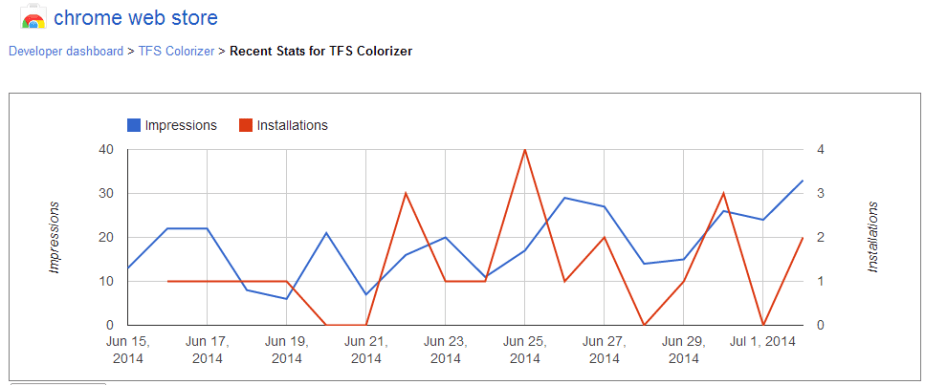
As a developer, I can see some statistics about how my plugins are doing. The Chrome extension is actually doing pretty well. It’s getting about 11 downloads a week which is pretty good given that I haven’t really promoted it anywhere.
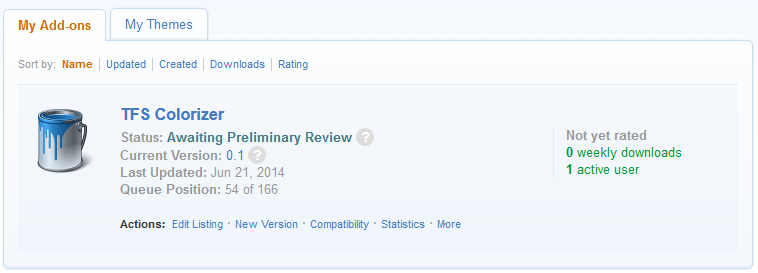
My Firefox add-in is still in review. When I submitted it to Mozilla almost two weeks ago I was asked if I wanted the 3-day preliminary review or the 10-day full review. I picked the quick 3-day review. you wouldn’t know it. I moved from 57th place yesterday to 54th today. Maybe they’re all watching the World Cup. Maybe they’re in the World Cup. Who knows.
Dynamically Generating Code at Run-Time with CIL
0I want to follow-up on yesterday’s post about the proxy generator with more details about how the code was created and what it does. First, I want to recap the problem I was trying to solve. With .NET web services and WCF, you use a client to connect to a server that implements an interface defining a service contract over a communications channel. As an example, let’s say your service contract does some simple math:
[ServiceContract]
public interface IMathContract : IMathContractBase {

 [OperationContract]
 int Add( int a, int b );

 [OperationContract]
 int Subtract( int a, int b );

 [OperationContract]
 int Multiply( int a, int b );

 [OperationContract]
 int Divide( int a, int b );
}
Pretty simple, right? The server’s implementation of the contract is pretty obvious:
[ServiceBehavior(InstanceContextMode = InstanceContextMode.Single)]
public class MathService : IMathContract {

	public int Add( int a, int b ) {
		return a + b;
	}

	public int Subtract( int a, int b ) {
		return a - b;
	}

	public int Multiply( int a, int b ) {
		return a * b;
	}

	public int Divide( int a, int b ) {
		if ( b == 0 ) throw new DivideByZeroException();
		return a / b;
	}
}
The only thing to note here is that if we call Divide with 0 as the denominator, we’re going to get a DivideByZeroException.
Our client is going to connect to the server via a communications channel. Assuming we’ve set up the server’s address and whatnot in the configuration file as “MathEndpoint”, the code to do some basic math looks like this:
ChannelFactory<IMathContract> factory = new ChannelFactory<IMathContract>( "MathEndpoint" );
IMathContract channel = factory.CreateChannel();
Console.WriteLine( "1 + 2 = " + channel.Add( 1, 2 ) );
Console.WriteLine( "4 - 1 = " + channel.Subtract( 4, 1 ) );
Console.WriteLine( "6 / 3 = " + channel.Divide( 6, 3 ) );
Console.WriteLine( "5 * 2 = " + channel.Multiply( 5, 2 ) );
Let’s say we’re worried about that DivideByZero exception so we guard against it.
ChannelFactory<IMathContract> factory = new ChannelFactory<IMathContract>( "MathEndpoint" );
IMathContract channel = factory.CreateChannel();
Console.WriteLine( "1 + 2 = " + channel.Add( 1, 2 ) );
Console.WriteLine( "4 - 1 = " + channel.Subtract( 4, 1 ) );
try {
	Console.WriteLine( "6 / 3 = " + channel.Divide( 6, 0 ) ); // DivideByZeroException
} catch ( Exception ) {
}
Console.WriteLine( "5 * 2 = " + channel.Multiply( 5, 2 ) ); // CommunicationObjectFaultedException!
What happens? Well, even though we caught the exception, having any exception at all put our channel in the Faulted stage and so hen we call the next method, we get a CommunicationObjectFaultedException. Specifically, we get the message:
System.ServiceModel.CommunicationObjectFaultedException: The communication object, System.ServiceModel.Channels.ServiceChannel, cannot be used for communication because it is in the Faulted state.
If we want to keep using our service we have to abort the channel and create another. The fact is, an exception could happen at any time. Here it’s the result of bad input but it could be network timeouts or anything else. We don’t want to wrap every call to our service in a try…catch block capable of resetting our channel. Instead, we want to create a fault-tolerant wrapper or proxy around it.
Here’s a simplified proxy:
public class FaultSafeProxy : IMathContract {

	private readonly ChannelFactory<IMathContract> _factory;
	private IMathContract _channel;

	public FaultSafeProxy( string endpoint ) {
		this._factory = new ChannelFactory<IMathContract>( endpoint );
	}

	#region Channel Management

	private void Abort() {
		if ( null == this._channel ) return;
		IServiceChannel serviceChannel = (IServiceChannel)this._channel;
		serviceChannel.Abort();
		this._channel = null;
	}

	private void Close() {
		if ( null == this._channel ) return;
		IServiceChannel serviceChannel = (IServiceChannel)this._channel;
		serviceChannel.Close();
		this._channel = null;
	}

	private IMathContract GetChannel() {
		if ( null == this._channel ) {
			this._channel = this._factory.CreateChannel();
		}
		return this._channel;
	}

	#endregion

	#region IMathContract

	public int Add( int a, int b ) {
		try {
			return this.GetChannel().Add( a, b );
		} catch ( Exception ) {
			this.Abort();
			throw;
		}
	}
	// …
	#endregion
}
Not bad, right? If we use our proxy we can call our methods safely:
FaultSafeProxy proxy = new FaultSafeProxy( "MathEndpoint" );
Console.WriteLine( "1 + 2 = " + proxy.Add( 1, 2 ) );
Console.WriteLine( "4 - 1 = " + proxy.Subtract( 4, 1 ) );
try {
	Console.WriteLine( "6 / 3 = " + proxy.Divide( 6, 0 ) ); // DivideByZeroException
} catch ( Exception ) {
}
Console.WriteLine( "5 * 2 = " + proxy.Multiply( 5, 2 ) ); // Works!
So that all being said, our project might have dozens of interfaces and each interface has dozens of methods. How do we want to generate our proxies? We have a few options:
1. By Hand
We could hand-code a proxy for each interface in our project. This has a lot of drawbacks:
- It’s tedious
- Every time we add an interface we have to code another proxy
- Every time we add, remove, or change a method we have to change our proxy.
- If we ever wanted to change how our proxies worked (to add logging, say), we’d have to go through each class and update it by hand.
It’s pretty obvious that you don’t want to do this if you can avoid it.
2. Statically Generated Code
We could write an EXE that uses reflection to pull our service contracts out of our DLL and generate proxy classes for them. So that we don’t have to know the proxy types ahead of time we could also generate some sort of proxy factory that, given an interface type, could return the correct proxy type. This isn’t bad, but it has some drawbacks too:
- We would have to run this tool every time we added, removed, or changed a method or interface.
- Our project would have a lot of generated proxy classes that developers would have to know to ignore.
There’s still one better way, and the topic of this discussion:
3. Dynamically Generated Code
It would be best if we could just say “I want a proxy for IMyServiceContract” and have one handed back no matter what our service contract is. No extra classes. Nothing to maintain. Just a perfect proxy every time. That’s what we’re going to do here.
CIL
It’s pretty well known that .NET languages get compiled down to CIL, the Common Intermediate Language (formerly known as MSIL, or the Microsoft Intermediate Language). It’s less well known that you can actually generate CIL at run time creating whole assemblies in memory to be used just while your code is executing. So how do we do it? The first thing to do is to get an idea of the CIL that you want to generate. First we create a prototype of the class that we want to dynamically create. Our hand-coded proxy, above is a good example. When I compiled that code I got a DLL. Using the IL disassembler tool (which is part of the Microsoft Windows SDK and on my computer was found at C:\Program Files (x86)\Microsoft SDKs\Windows\v8.1A\bin\NETFX 4.5.1 Tools\ildasm.exe) we can have a look.

You’re going to want to look at the CIL for the class, constructor, and all the methods in your prototype class. After that, you’re going to start building dynamic code.
Step 1: Create an assembly builder
// Create our dynamic assembly name and version
AssemblyName assemblyName = new AssemblyName( ASSEMBLY_NAME );
assemblyName.Version = new Version( 1, 0, 0, 0 );
// Create the assembly builder, specifying whether we'll want to only run the assembly or run and save it
AssemblyBuilder assemblyBuilder = AppDomain.CurrentDomain.DefineDynamicAssembly(
	assemblyName,
	//				AssemblyBuilderAccess.Run
	AssemblyBuilderAccess.RunAndSave
	);
Note “Run” vs. “RunAndSave“. If you use “RunAndSave” your assembly will be created on disk, which is useful for debugging. In your final code, you’ll want to just use “Run“.
Step 2: Create a module builder
ModuleBuilder moduleBuilder = assemblyBuilder.DefineDynamicModule(
	assemblyBuilder.GetName().Name,
	assemblyBuilder.GetName().Name + ".mod"  // Note: A module file name is necessary in order to save
	);
Step 3: Create a type builder
// Define our custom type, which implements the given interface and IDisposable
TypeBuilder typeBuilder = moduleBuilder.DefineType(
GenerateTypeName(),
 TypeAttributes.Class,
 typeof ( Object ),
 interfacesToImplement // type[]
 );
Here we specify our type name, the fact that it’s a class descended from Object, and the interfaces we want to implement.
Step 4: Add members
Now we just want to go through and add our members as we would to create the CIL we saw in the disassembler. Let’s look at our GetChannel method. In C#, it looks like this:
	private IMathContract GetChannel() {
		if ( null == this._channel ) {
			this._channel = this._factory.CreateChannel();
		}
		return this._channel;
	}]
In IL, it looks like this:
.method private hidebysig instance class TestProxyGenerator.Prototype.IMathContract
        GetChannel() cil managed
{
  // Code size       47 (0x2f)
  .maxstack  2
  .locals init ([0] class TestProxyGenerator.Prototype.IMathContract CS$1$0000,
           [1] bool CS$4$0001)
  IL_0000:  nop
  IL_0001:  ldnull
  IL_0002:  ldarg.0
  IL_0003:  ldfld      class TestProxyGenerator.Prototype.IMathContract TestProxyGenerator.Prototype.FaultSafeProxy::_channel
  IL_0008:  ceq
  IL_000a:  ldc.i4.0
  IL_000b:  ceq
  IL_000d:  stloc.1
  IL_000e:  ldloc.1
  IL_000f:  brtrue.s   IL_0024
  IL_0011:  nop
  IL_0012:  ldarg.0
  IL_0013:  ldarg.0
  IL_0014:  ldfld      class [System.ServiceModel]System.ServiceModel.ChannelFactory`1<class TestProxyGenerator.Prototype.IMathContract> TestProxyGenerator.Prototype.FaultSafeProxy::_factory
  IL_0019:  callvirt   instance !0 class [System.ServiceModel]System.ServiceModel.ChannelFactory`1<class TestProxyGenerator.Prototype.IMathContract>::CreateChannel()
  IL_001e:  stfld      class TestProxyGenerator.Prototype.IMathContract TestProxyGenerator.Prototype.FaultSafeProxy::_channel
  IL_0023:  nop
  IL_0024:  ldarg.0
  IL_0025:  ldfld      class TestProxyGenerator.Prototype.IMathContract TestProxyGenerator.Prototype.FaultSafeProxy::_channel
  IL_002a:  stloc.0
  IL_002b:  br.s       IL_002d
  IL_002d:  ldloc.0
  IL_002e:  ret
} // end of method FaultSafeProxy::GetChannel
So how do we create that? Let’s go bit by bit. Start with a MethodBuilder and ILGenerator.
MethodBuilder methodBuilder = typeBuilder.DefineMethod(
	"GetChannel",
	MethodAttributes.Private | MethodAttributes.HideBySig,
	CallingConventions.Standard,
	typeof( T ),
	new Type[0]
	);
ILGenerator il = methodBuilder.GetILGenerator();
// Declare local variables
il.DeclareLocal( typeof( T ) );
il.DeclareLocal( typeof( bool ) );
All the IL_00XX values are like GOTO labels and we can define them up front.
// Define some labels ahead of time
Label label0024 = il.DefineLabel();
Label label002D = il.DefineLabel();
Use reflection to get some of the methods outside of our class, in this case ChannelFactory’s CreateChannel method.
// Get some methods ahead of time
MethodInfo channelFactoryCreateChannelMethodInfo = typeof( ChannelFactory<T> ).GetMethod( "CreateChannel", new Type[0] );
Define our locals. This corresponds to
.locals init ([0] class TestProxyGenerator.Prototype.IMathContract CS$1$0000,
[1] bool CS$4$0001)
il.DeclareLocal( typeof( T ) );
il.DeclareLocal( typeof( bool ) );
Then we emit the code that checks if our channel exists
  IL_0000:  nop
  IL_0001:  ldnull
  IL_0002:  ldarg.0
  IL_0003:  ldfld      class TestProxyGenerator.Prototype.IMathContract TestProxyGenerator.Prototype.FaultSafeProxy::_channel
  IL_0008:  ceq
  IL_000a:  ldc.i4.0
  IL_000b:  ceq
  IL_000d:  stloc.1
  IL_000e:  ldloc.1
  IL_000f:  brtrue.s   IL_0024
il.Emit( OpCodes.Nop );
il.Emit( OpCodes.Ldnull );
il.Emit( OpCodes.Ldarg_0 );
il.Emit( OpCodes.Ldfld, this._channelField );
il.Emit( OpCodes.Ceq );
il.Emit( OpCodes.Ldc_I4_0 );
il.Emit( OpCodes.Ceq );
il.Emit( OpCodes.Stloc_1 );
il.Emit( OpCodes.Ldloc_1 );
il.Emit( OpCodes.Brtrue_S, label0024 );
If it doesn’t, we call the factory method to create it:
  IL_0011:  nop
  IL_0012:  ldarg.0
  IL_0013:  ldarg.0
  IL_0014:  ldfld      class [System.ServiceModel]System.ServiceModel.ChannelFactory`1<class TestProxyGenerator.Prototype.IMathContract> TestProxyGenerator.Prototype.FaultSafeProxy::_factory
  IL_0019:  callvirt   instance !0 class [System.ServiceModel]System.ServiceModel.ChannelFactory`1<class TestProxyGenerator.Prototype.IMathContract>::CreateChannel()
  IL_001e:  stfld      class TestProxyGenerator.Prototype.IMathContract TestProxyGenerator.Prototype.FaultSafeProxy::_channel
  IL_0024:  ldarg.0
  IL_0025:  ldfld      class TestProxyGenerator.Prototype.IMathContract TestProxyGenerator.Prototype.FaultSafeProxy::_channel
  IL_002a:  stloc.0
  IL_002b:  br.s       IL_002d
il.Emit( OpCodes.Nop );
il.Emit( OpCodes.Ldarg_0 );
il.Emit( OpCodes.Ldarg_0 );
il.Emit( OpCodes.Ldfld, this._factoryField );
il.Emit( OpCodes.Callvirt, channelFactoryCreateChannelMethodInfo );
il.Emit( OpCodes.Stfld, this._channelField );
il.Emit( OpCodes.Nop );
il.MarkLabel( label0024 );
il.Emit( OpCodes.Ldarg_0 );
il.Emit( OpCodes.Ldfld, this._channelField );
il.Emit( OpCodes.Stloc_0 );
il.Emit( OpCodes.Br_S, label002D );
And finally, we return the channel:
  IL_002b:  br.s       IL_002d
  IL_002d:  ldloc.0
  IL_002e:  ret
il.MarkLabel( label002D );il.Emit( OpCodes.Ldloc_0 );il.Emit( OpCodes.Ret );
I’m not going to lie. This can be a real pain in the ass to go through and debug. You’ll have to do this for each method you want to generate. Because you’re doing this dynamically, you’ll find yourself using reflection to iterate through the methods that you want to create.If you want to save your assembly to debug your type, this is the time to do it:
assemblyBuilder.Save( assemblyBuilder.GetName().Name + ".dll" );
Step 5: Create the Type and Object
Once you’re done with the TypeBuilder, you’re going to want to create an instance of your new type and that’s easy enough to do:
Type generatedType = typeBuilder.CreateType();
object instance = Activator.CreateInstance( generatedType, endpoint, userName, password );
And that’s it. You’ve got a dynamically generated type. If you made your type implement an interface, like a service contract in our example, you can just cast it to the interface and use the methods on it.
TFS Colorizer Extension for Firefox
0
At least one of my colleagues uses Firefox, so I created the TFS colorizer as a Firefox extension.
The extension uses the new Firefox Add-On SDK. Specifically, the extension uses the page-mod API to detect when a TFS board-like page is being displayed and then applies modifications to it. I found it more difficult to create the extension for Firefox than I did for Chrome. There were two tricky parts:
Options
There is no easy way to create a nice Options page with the Add-On SDK. There’s a way to create an ugly one: the simple-prefs API. It can list out some settings easily, but that’s not what I want.
In the end, I had to create a toolbar button and have that launch my options page. This code sets up the button in the action bar and opens the options page when it’s clicked. There’s some code in there to make sure the tab is only ever opened once.
var button = buttons.ActionButton( {
	id: "colorizer-options",
	label:	"TFS Colorizer",
	icon: {
		"16": "./icon_16.png",
		"32": "./icon_32.png",
		"64": "./icon_64.png"
	},
	/**
	 * This is called when our toolbar button is clicked.
	 */
	onClick: function ( state ) {
		try {
			// Get the options URL
			var url = self.data.url( "options.html" );
			// For each open tab...
			for ( var i = 0; i < tabs.length; i++ ) {
				var tab = tabs[i];
				// If this is our options tab...
				if ( tab.url == url ) {
					// Activate the tab
					tab.activate();
					// We're done
					return ;
				}
			}
			// We didn't find the options page open, above, so open it.
			tabs.open( url );
		} catch ( e ) {
			console.error( e.message );
		}
	}
});
I would have preferred that this show up in the Add-Ons “Options” sections since my extension doesn’t really require a button cluttering up the toolbar, but I didn’t see a better way.
Accessing Storage
Getting the user’s settings in and out of storage was also a trial. In Firefox add-ons, you have two types of javascript files:
- lib/main.js: the main entry point to the add-on. This has access to the add-on APIs, such as the ones that store data, but does not have access to the browser page.
- data/*.js a.k.a. content scripts: These have access to the browser page but they don’t have access to the APIs.
So you have a script that can load and store your user settings but won’t affect the page and a script that runs on the page but can’t access the user settings. How to communicate between the two? What I ended up using, and this was from the documentation, was the “port.on” and “port.emit” functionality to pass data between the two in a request/response model. When the content page wanted to load settings from file, it would make a request via:
// Load settings
self.port.emit( "loadSettingsRequest", null );
Main.js would catch that request and issue a response:
pageMod.PageMod( {
	include: self.data.url( "options.html" ),
	contentScriptFile: [
		self.data.url("jquery-2.1.0.min.js"),
		self.data.url("common.js"),
		self.data.url("options.js")
	],
	contentScript: "TfsOptions.initialize();",
	onAttach: function (worker) {
		worker.port.on( "loadSettingsRequest",  function () {
			// Pull the settings from storage
			var json = ss.storage.settings;
			// Parse the json
			var settings;
			if ( null != json ) {
				settings = JSON.parse( json );
			} else {
				settings = null;
			}
			// Send the response
			worker.port.emit( "loadSettingsResponse", settings );
		} );
The content page would catch the response and take action:
self.port.on( "loadSettingsResponse",  function ( settings ) {
	try {
		// If the settings are null, use the defaults
		if ( null == settings ) {
			settings = TfsDefaults.defaultSettings;
		}
		// Populate the table with the settings
		TfsOptions.populateTable( $table, settings );
	} catch( e ) {
		console.error( e.message );
	}
} );
Note that in order to use the port.on/emit code, the content script uses “self” and the main script uses “worker”. With these two things worked out, the rest was pretty straightforward and I was able re-use most of the existing code.
The code for the FireFox add-on is up on github. I’m trying to get the extension into the Mozilla add-ons repository. It’s currently undergoing their review process.
TFS Colorizer extension for Google Chrome
15
We use Microsoft’s Team Foundation Server at work. It has a task board showing the development, testing, documentation, and other tasks that go into a release as cards in “Not Started”, “In Progress”, or “Done” columns. The idea is to let you see the status of your project at a glance, but all the cards are the same color. What’s the status of the release? Are we waiting on development? Testing? UAT? You can’t tell without reading every card title. It would be better if, say, all development tasks were in green, all testing tasks were in orange, and all development tasks were in yellow. Is the “Not Started” column filled with mostly green? Yes? Then we’re still waiting for development. When we see the “Done” column filling up with green and the “In Progress” columns filling up with orange, we know we’ve entered the testing phase. If you can colorize the cards on the board, you can see the status of your project at a glance.
That’s what this plugin does. It lets you associate card colors with text contents. If the card title starts with “Analysis” it’s red. If it contains “Testing”, it’s orange, and so on. It makes the TFS board far, far more useful.
Download the plugin here: TFS Colorizer
The code is up on github.
 Dogs Chasing Squirrels